Magicplan import
Three ways to turn a magicplan Statistics export into a project: in-app upload, forwarded email, and the MCP tool.
Magicplan is a phone app that measures a home and exports a Statistics CSV. RenovAI parses that export and creates the project’s rooms (spaces) — so you capture the home once and never re-type it.
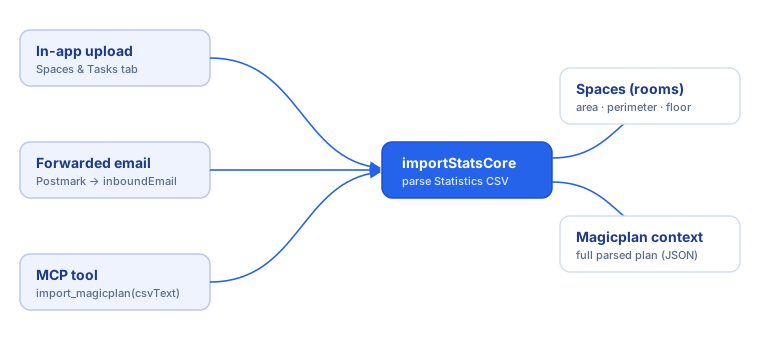
Three ways to import
1. In-app upload — on a project’s Spaces & Tasks tab, upload the Statistics CSV. The fastest path when you’re already in the app.
2. Forwarded email — email the Magicplan export to a project’s conversation address. Postmark receives it, the inbound webhook extracts the CSV, and it imports into that conversation’s project. (Inbound is served by convex/inboundEmail.ts, authenticated with a shared secret.)
3. MCP tool — an AI assistant calls import_magicplan({ projectId, csvText }). Combine with create_project to go from nothing to a populated project in two tool calls. See MCP server.
What gets imported
All three paths funnel into one shared importer (importStatsCore), so the result is identical:
- The CSV’s ROOM ATTRIBUTES rows become spaces (name, type, floor, area, perimeter).
- The full parsed plan (all six sections — plan/floor/room/wall/object) is stored as the project’s “Magicplan context”, which the
get_magicplan_contextMCP tool can read. - Re-importing reconciles only Magicplan-sourced spaces — rooms matched by name are updated in place (so their Tasks & Elements stay attached), rooms missing from the new file are removed, and new rooms are added. Rooms you added by hand survive untouched. A re-import shows a confirmation preview (kept / removed / added) first, and warns if a room being removed still has Tasks or Elements attached.
About the CSV
The Statistics export is a sectioned CSV — stacked blocks (PLAN ATTRIBUTES, FLOOR ATTRIBUTES, ROOM ATTRIBUTES, WALL ATTRIBUTES, OBJECT COUNT, Object Attributes) separated by header rows and blank lines, with numbers carrying unit suffixes (2.67 m, 6.02 m²). RenovAI’s parser handles all of it.