MCP server
Connect Claude/ChatGPT to your workspace — the durable Convex MCP server, its tools, and how to authenticate.
RenovAI ships a durable MCP server so an AI assistant can read and update your workspace directly. It’s a JSON-RPC endpoint served from Convex at https://<deployment>.convex.site/mcp.
It speaks the Streamable HTTP transport and implements the latest MCP spec, 2025-11-25: POST a JSON-RPC message and you get back either a single JSON response (the default) or, for a long-running tool, a text/event-stream (SSE) stream of progress events ending in the result. Clients that only speak the streamable transport connect the same way — no separate setup. Plain JSON-only clients keep working unchanged.
On initialize the server negotiates the protocol version: it honours your requested version when it’s one it supports (2025-11-25, 2025-06-18, 2025-03-26, or 2024-11-05) and otherwise answers with its latest, 2025-11-25. Older clients are never broken.
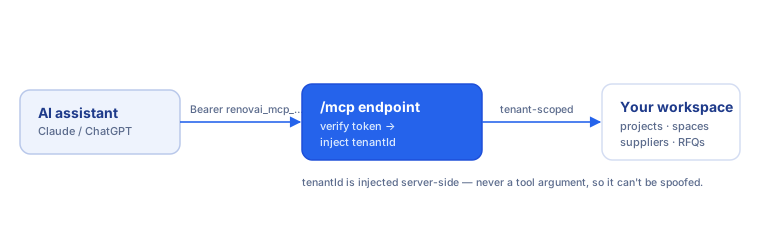
Connecting
First, mint a token in Settings → MCP tokens (shown once). Then:
Claude Code
claude mcp add --transport http renovai https://<deployment>.convex.site/mcp \
  --header "Authorization: Bearer renovai_mcp_<your-token>"
Claude Desktop / other stdio clients — bridge with mcp-remote:
{
  "mcpServers": {
    "renovai": {
      "command": "npx",
      "args": ["-y", "mcp-remote", "https://<deployment>.convex.site/mcp",
               "--header", "Authorization: Bearer renovai_mcp_<your-token>"]
    }
  }
}
How auth & scoping work
Every tools/call carries Authorization: Bearer renovai_mcp_…. The server resolves the token to its owning { userId, tenantId } and injects tenantId into every tool call server-side — it’s never a tool argument, so the model can’t supply or spoof it. Each tool re-verifies that the rows it touches belong to that tenant. Only a SHA-256 hash of the token is ever stored.
Tool catalog
The server exposes full CRUD parity with the RenovAI web app: every entity you can read, create, update or delete in the UI has a matching tool. Each tool declares its nature so a client can render and gate it sensibly — read (query), create, update, delete (destructive), or action (a side-effecting call such as sending email or minting a signed URL). Deletes require confirmation before they run (see Protocol capabilities).
tenantId is never a tool argument — it’s derived from your bearer token and
injected server-side (see How auth & scoping work), so it
never appears in the Key args below.
Projects & homes
| Tool | Nature | Purpose | Key args |
|---|---|---|---|
list_projects |
read | List all renovation projects, newest first | — |
get_project |
read | Get one project by id | projectId |
create_project |
create | Create a renovation project | name, type |
update_project |
update | Patch a project (name, status, deadline…) | projectId |
delete_project |
delete | Permanently delete a project and its dependents | projectId, confirm |
list_homes |
read | List homes/properties in the workspace | — |
get_home |
read | Get one home by id | homeId |
create_home |
create | Create a home/property | name |
update_home |
update | Patch a home | homeId |
delete_home |
delete | Permanently delete a home | homeId, confirm |
Spaces (rooms) & elements
| Tool | Nature | Purpose | Key args |
|---|---|---|---|
list_spaces |
read | List the spaces (rooms) of a project | projectId |
create_space |
create | Add a space (room) to a project | projectId, name, type |
update_space |
update | Patch a space | spaceId |
delete_space |
delete | Delete a space (cascades to its elements) | spaceId, confirm |
list_elements |
read | List the elements of a space | spaceId |
create_element |
create | Add an element (fixture/surface) to a room | spaceId, category, name |
update_element |
update | Patch an element | elementId |
delete_element |
delete | Delete an element | elementId, confirm |
Tasks & timeline
| Tool | Nature | Purpose | Key args |
|---|---|---|---|
list_tasks |
read | List the renovation tasks of a project | projectId |
create_task |
create | Create a task on a project | projectId, description, category |
update_task |
update | Patch a task via a partial patch | taskId |
delete_task |
delete | Delete a task | taskId, confirm |
get_timeline |
read | Get the most recent timeline events for a project | projectId |
add_timeline_event |
create | Append a timeline event to a project | projectId, type |
update_timeline_event |
update | Patch a timeline event | eventId |
delete_timeline_event |
delete | Delete a timeline event | eventId, confirm |
timeline_ideation_context |
read | Room/element inventory + duration heuristics + budgets for a project, in one call (data only — no recommendations) | projectId |
Materials, bundles & selections
| Tool | Nature | Purpose | Key args |
|---|---|---|---|
list_materials |
read | List materials for a task or home | taskId/homeId |
create_material |
create | Add a material | description, quantity, unit, providedBy |
update_material |
update | Patch a material | materialId |
delete_material |
delete | Delete a material | materialId, confirm |
list_bundles |
read | List a project’s bundles (work packages) | projectId |
create_bundle |
create | Create a bundle | projectId, name |
update_bundle |
update | Patch a bundle | bundleId |
delete_bundle |
delete | Delete a bundle | bundleId, confirm |
list_selections |
read | List material selections + their candidates | projectId |
create_selection |
create | Create a material selection | elementId, name |
update_selection |
update | Patch a material selection | selectionId |
delete_selection |
delete | Delete a material selection | selectionId, confirm |
add_selection_candidate |
create | Add a candidate material to a selection | selectionId, description |
choose_selection_candidate |
update | Pick a candidate as the chosen material | selectionId, materialId |
reopen_selection |
update | Reopen a decided selection | selectionId |
Inspiration (boards & assets)
| Tool | Nature | Purpose | Key args |
|---|---|---|---|
list_boards |
read | List a project’s inspiration boards | projectId |
create_board |
create | Create an inspiration board | projectId, name |
update_board |
update | Patch a board | boardId |
delete_board |
delete | Delete a board | boardId, confirm |
list_assets |
read | List a project’s assets | projectId |
get_asset_upload_url |
action | Mint a signed R2 URL to upload an asset (returns signedUrl, r2Key) |
projectId |
create_asset |
create | Persist an asset record after upload | projectId, r2Key, type |
update_asset |
update | Patch an asset (retag, re-pin, link) | assetId |
delete_asset |
delete | Delete an asset | assetId, confirm |
get_asset_url |
action | Mint a signed R2 download URL for an asset | assetId |
Suppliers & contacts
| Tool | Nature | Purpose | Key args |
|---|---|---|---|
list_suppliers |
read | List all suppliers in the workspace | — |
get_supplier |
read | Get a supplier together with its contacts | supplierId |
create_supplier |
create | Add a supplier | name |
update_supplier |
update | Patch a supplier | supplierId |
delete_supplier |
delete | Delete a supplier (cascades to its contacts) | supplierId, confirm |
list_contacts |
read | List a supplier’s contacts | supplierId |
create_contact |
create | Add a contact person to a supplier | supplierId, name, preferredChannel |
update_contact |
update | Patch a supplier contact | contactId |
delete_contact |
delete | Delete a supplier contact | contactId, confirm |
RFQs & quotes
| Tool | Nature | Purpose | Key args |
|---|---|---|---|
list_rfqs |
read | List a project’s requests-for-quote | projectId |
get_rfq |
read | Get an RFQ with its received quote responses | rfqId |
create_rfq |
create | Create a draft RFQ for a project + supplier | projectId, supplierId |
update_rfq |
update | Patch an RFQ (status, due date…) | rfqId |
delete_rfq |
delete | Delete an RFQ (cascades to its responses) | rfqId, confirm |
list_quote_responses |
read | List the quote responses received for an RFQ | rfqId |
record_quote_response |
create | Record a quote response for an RFQ | rfqId, totalQuote |
update_quote_response |
update | Patch a quote response | responseId |
delete_quote_response |
delete | Delete a quote response | responseId, confirm |
list_line_items |
read | List the line items of a quote response | rfqResponseId |
update_line_item |
update | Patch a line item (amount, wanted…) | lineItemId |
bundle_coverage |
read | Deterministic quote coverage for a bundle — which tasks have zero quote coverage yet | bundleId |
Finances
| Tool | Nature | Purpose | Key args |
|---|---|---|---|
list_finances |
read | List the home finance ledger | homeId (optional) |
create_finance_item |
create | Add a finance ledger item | name, direction, category, status |
update_finance_item |
update | Patch a finance item | financeId |
delete_finance_item |
delete | Delete a finance item | financeId, confirm |
start_finance_extraction |
action (streaming) | Extract money items from an uploaded document via AI — streams progress over SSE, or returns an id to poll | homeDocumentId |
get_finance_extraction |
read | Status/result of a start_finance_extraction job |
id |
list_finance_drafts |
read | List staged draft finance lines pending review | homeDocumentId |
approve_finance_drafts |
create | Commit reviewed draft lines into the finance ledger | items |
Documents vault
| Tool | Nature | Purpose | Key args |
|---|---|---|---|
list_documents |
read | List the home documents vault | homeId (optional) |
record_document |
create | Register a vault document after upload | docType, title, r2Key |
update_document |
update | Patch a document’s metadata | documentId |
delete_document |
delete | Delete a vault document | documentId, confirm |
get_document_url |
action | Mint a signed R2 download URL for a document | documentId |
Conversations & messaging
| Tool | Nature | Purpose | Key args |
|---|---|---|---|
list_messages |
read | List a project’s conversations and their messages | projectId |
send_supplier_message |
action | Email a supplier (sets a per-conversation Reply-To so replies thread back in) | projectId, supplierId, subject |
reply_to_conversation |
action | Reply to an existing email conversation and record the outbound message | conversationId, bodyHtml/bodyText |
delete_conversation |
delete | Permanently delete a conversation and all its messages/attachments | conversationId, confirm |
Magicplan & plan extraction
| Tool | Nature | Purpose | Key args |
|---|---|---|---|
get_magicplan_context |
read | The full parsed Magicplan plan for a project | projectId |
generate_import_email |
action | Get or mint your Magicplan import email address | — |
import_magicplan |
update | Import a Magicplan Statistics CSV into a project (see Magicplan import) | projectId, csvText |
extract_plan |
action (streaming) | Extract rooms from an uploaded floor-plan image via vision AI — streams progress over SSE, or returns an id to poll | projectId, r2Key |
get_plan_extraction |
read | Status/result of an extract_plan job (running / done / error) |
id |
A typical assistant flow: create_project → import_magicplan (paste the CSV) → list_spaces to confirm the rooms imported.
tools/list is paginated (50 tools per page); follow nextCursor to fetch the rest.
Protocol capabilities
The server implements the 2025-11-25 feature set on top of the plain JSON-RPC calls, so capable clients get richer, safer interactions while simpler clients keep working:
- Tool annotations. Every tool carries advisory hints —
readOnlyHint,destructiveHint,idempotentHint,openWorldHint, plus a humantitle— surfaced intools/list. Clients use them to render and gate tools (e.g. flag destructive deletes, badge read-only queries, mark tools that reach external systems like email or R2). They’re hints, not a security boundary — tenancy is always enforced server-side regardless. - Structured output. Tools that return structured data advertise an
outputSchema(JSON Schema 2020-12) intools/listand emitstructuredContentalongside the human-readable text in everytools/callresult, so a client can consume results as typed JSON without re-parsing prose. - Elicitation-based delete confirmations. Destructive
delete_*tools require confirmation before they run. Clients that support elicitation get an interactiveelicitation/createround-trip over SSE — a precise impact preview of exactly what will be destroyed (including cascade counts where relevant), which you accept or decline; the tool only runs on accept. Clients that don’t support elicitation get a non-error result asking them to re-invoke the tool withconfirm: true. Either way, nothing is deleted without an explicit second step.